
To deposit on Casino Plus with GCash, log in, open the Cashier, choose GCash, enter your amount, and approve the payment in your GCash app. You need a fully verified GCash account in your own name, and deposits usually reflect instantly. This guide covers the steps, what to prepare, and how to fix a deposit that does not show up.
Why Deposit with GCash
GCash is one of the most widely used e-wallets in the Philippines, alongside Maya and bank transfer at Casino Plus. It is built for mobile, deposits usually land instantly, and the same wallet can receive your withdrawals later. Because it keeps your funding and payouts in one verified account, it is a practical default for most Filipino players.
Before You Deposit
Two things make GCash deposits go smoothly. First, your GCash account should be fully verified, since unverified wallets can cause failed transactions. Second, the GCash account should be in the same name as your Casino Plus account, which keeps later withdrawals from being held by name-match checks. Make sure you have enough balance in GCash, and note the minimum deposit, which starts from PHP 500; the exact minimum is shown in the Cashier. Check the Cashier as well for any fees or per-transaction limits before you confirm, so the amount that reaches your balance is what you expect.
How to Deposit with GCash
There are two routes, both quick. Choose whichever you find easier.
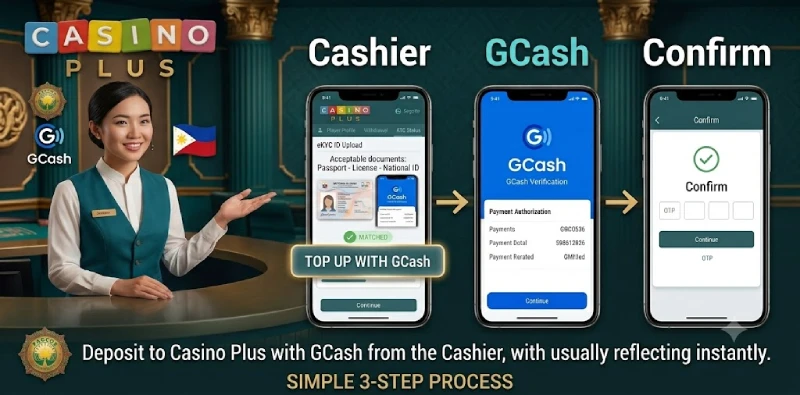
Deposit from the Cashier
- Log in to Casino Plus on the website or app.
- Open the Cashier and select Deposit, then choose GCash.
- Enter the amount you want to deposit and confirm.
- Approve the request in your GCash app, or enter the 6-digit code sent to your phone.
- Return to Casino Plus and refresh; your balance should reflect the deposit.
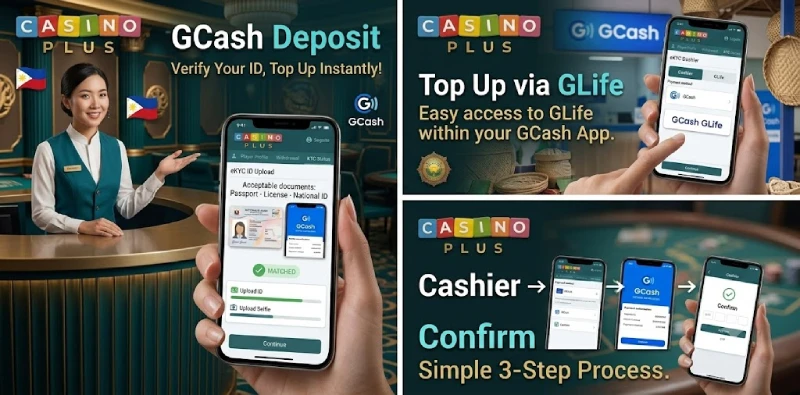
Top Up via GCash GLife
You can also top up from inside GCash. In the GCash app, open GLife, find Casino Plus, then use Top Up, select your game or amount, and confirm. The balance reflects in your Casino Plus account in real time, and the same GLife screen has a Withdraw option for cashing out later.
If Your Deposit Doesn’t Reflect
Most deposits are instant. If money left your GCash but your balance has not updated, do not deposit again right away, because the first transfer may still be processing. The table lists common causes and fixes before you contact support.
| Issue | What to do |
|---|---|
| Balance not updated | Refresh or re-log in; check your GCash transaction history |
| Unverified GCash | Complete GCash verification, then retry |
| GCash maintenance | Wait and try again after the maintenance window |
| Wrong amount or below minimum | Re-enter an amount at or above the cashier minimum |
| Money left GCash but not credited | Keep the reference number and use Call Back support |
Frequently Asked Questions
What is the minimum GCash deposit on Casino Plus?
The minimum deposit starts from PHP 500. The exact minimum for your account is shown in the Cashier when you choose GCash.
Does my GCash need to be verified?
Yes. Use a fully verified GCash account in your own name. Unverified wallets can fail, and a name mismatch can hold later withdrawals.
How fast are GCash deposits?
GCash deposits usually reflect instantly. If yours does not, refresh, check your GCash history, then contact support with the reference number.
Can I withdraw back to GCash?
Yes. Once verified, you can withdraw to the same GCash account, which usually receives winnings quickly. See the withdrawal guide for the steps.
Top Up and Start Playing
A verified GCash account in your own name makes deposits on Casino Plus fast and withdrawals smooth later. For cashing out, see our withdrawal guide, or try Maya as an alternative.
Casino Plus is open only to players aged 21 and above. Play responsibly.